Build your branded booking site: Support multi-location scheduling, Dynamic Pricing & Online Payments
Gaxas Booking brings scheduling, resource management and payment collection into one platform, so customers can book online anytime and your team no longer needs to confirm timeslots by phone.
Complete Booking Service
From Scheduling to Payment
The Booking system is organized into six modules following the navigation structure, covering everything from front-end customer bookings to back-office operations — configure once and reuse long term.
Appointment Management
Manage both front-end bookings and orders created manually in the back office. Filter by location, service, status and date range, then view details, reschedule, cancel or mark as complete.
Locations & Scheduling
Set opening hours for each location and flexibly manage staff and equipment availability with recurring Plan Mode, one-off Special Mode adjustments and Schedule Off periods.
Dynamic Pricing
Configure trigger conditions by service type, member tier and date type (weekday/weekend/holiday), so the front end automatically calculates and displays the matching price.
Resource Management
Define resource types such as staff, venues and equipment with skill tags, and mark whether each is consumable — the foundation for scheduling and capacity calculation.
Custom Forms
Bind custom fields to specific services and locations, set them as required, and let the form render automatically when a customer selects the matching service.
Payment & Order Sync
The unified order center syncs booking details, customer info, amount and payment status in real time, with full visibility into payment attempts and transaction records.
Turning the Booking Flow
Into a Seamless Experience
From selecting a service to completing payment, customers can finish a booking in four simple steps — no manual intervention or phone confirmation required.
Select a Service & Time Slot
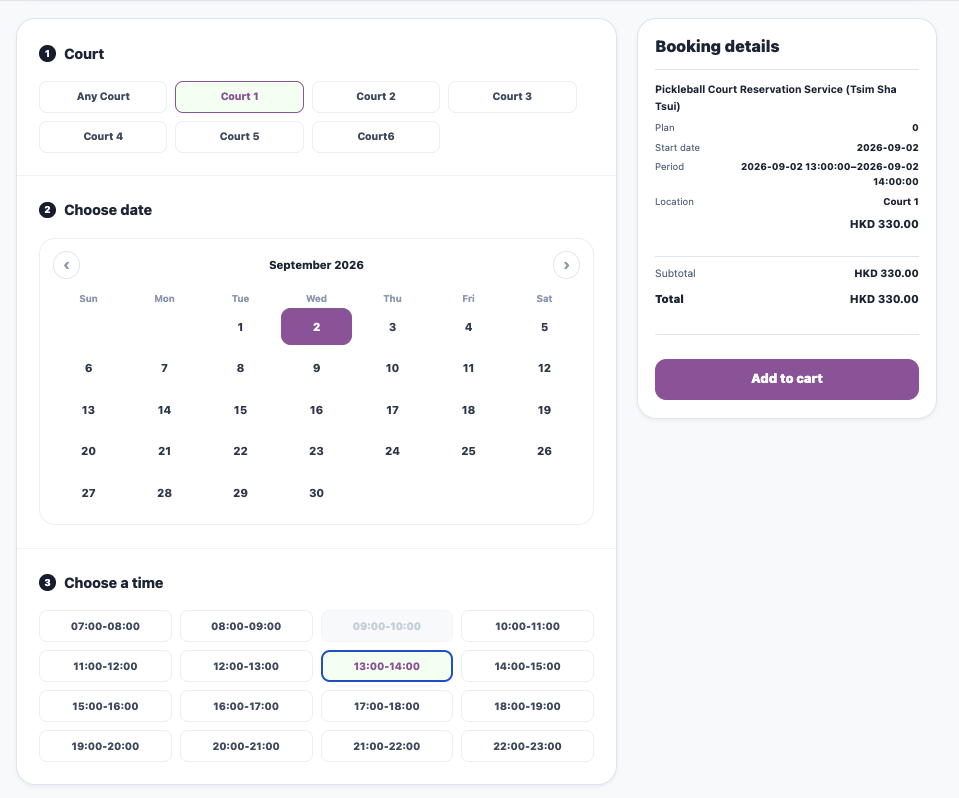
Filter instantly by service type, location and available time slots, with prices automatically calculated by member tier and date.
Enter Details & Confirm
Complete contact details and any custom form fields, then add multiple services to the cart in a single booking.
Pay Online or Offline
Accept instant payment through a third-party gateway, or choose offline payment while the system holds the time slot.
Automatic Confirmation
Once payment is completed the status updates to confirmed automatically, and customers can check My Bookings and transaction history anytime.
Two Booking Modes
For Different Business Scenarios
When creating a booking, choose between two modes: instant confirmation without payment, or locking capacity first while awaiting payment — flexible enough for both self-service and staff-assisted bookings.
Instant Confirmed Booking
After entering customer details, service and time slot, the system skips payment and immediately deducts capacity with a confirmed status — ideal for free or pay-on-site scenarios.
- Capacity is deducted immediately and status shows as confirmed right away
- No payment gateway involved — suited to free trials or on-site payment
- Staff can also create bookings manually on behalf of customers
Reserved with Offline Payment
After entering booking details, the system locks the capacity as reserved and generates an order; once payment is confirmed, the status changes to confirmed.
- Capacity is locked immediately and status shows as reserved
- An order is generated in parallel — status becomes confirmed once payment is verified
- Unconfirmed payments are automatically cancelled and the slot released after the timeout
A Branded Booking Site
Right on Your Customers' Phones
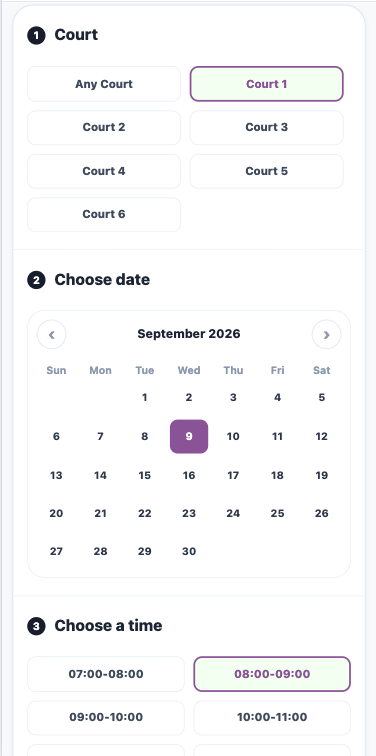
The front-end booking template manages visual branding and anti-fraud protection, letting customers browse services, pick a time slot and pay in one smooth flow.
Your Payment Channels
Ready to Connect
Booking comes with a built-in payment module that connects to major payment gateways, automatically syncing orders and transaction records once payment completes.
Ready to Accept Payments Instantly
Once a payment gateway account is linked, the front-end booking site can accept online payments immediately, with transaction status written back to the order automatically.
Unified Revenue & Transaction Overview
View total revenue, successful transaction count and pending (reserved) amounts on one page, with payment attempt logs for easy reconciliation.
One Booking System
Across Different Industries
Time-Based Venue Pricing
Courts and rooms open for online booking by time slot, with peak-hour pricing applied automatically to avoid double-booking, plus daily and per-order booking limits for risk control.
- Set weekday/weekend/holiday differential pricing by service type and date type
- The system auto-generates the available time-slot matrix to prevent overbooking
- Supports daily and per-order maximum booking limits per customer